Knowledge Tool
Overview
Tools can be used within Dartmouth Chat to expand its functionality by performing simple tasks. Behind the scenes, Tools are Python scripts that – when enabled and configured – allow you to access additional functionality within Dartmouth Chat. Tools are enabled by the user, but triggered by the model. Turning them on does not guarantee that the model will use them. Once a tool is enabled, however, you can explicitly ask the model to use it.
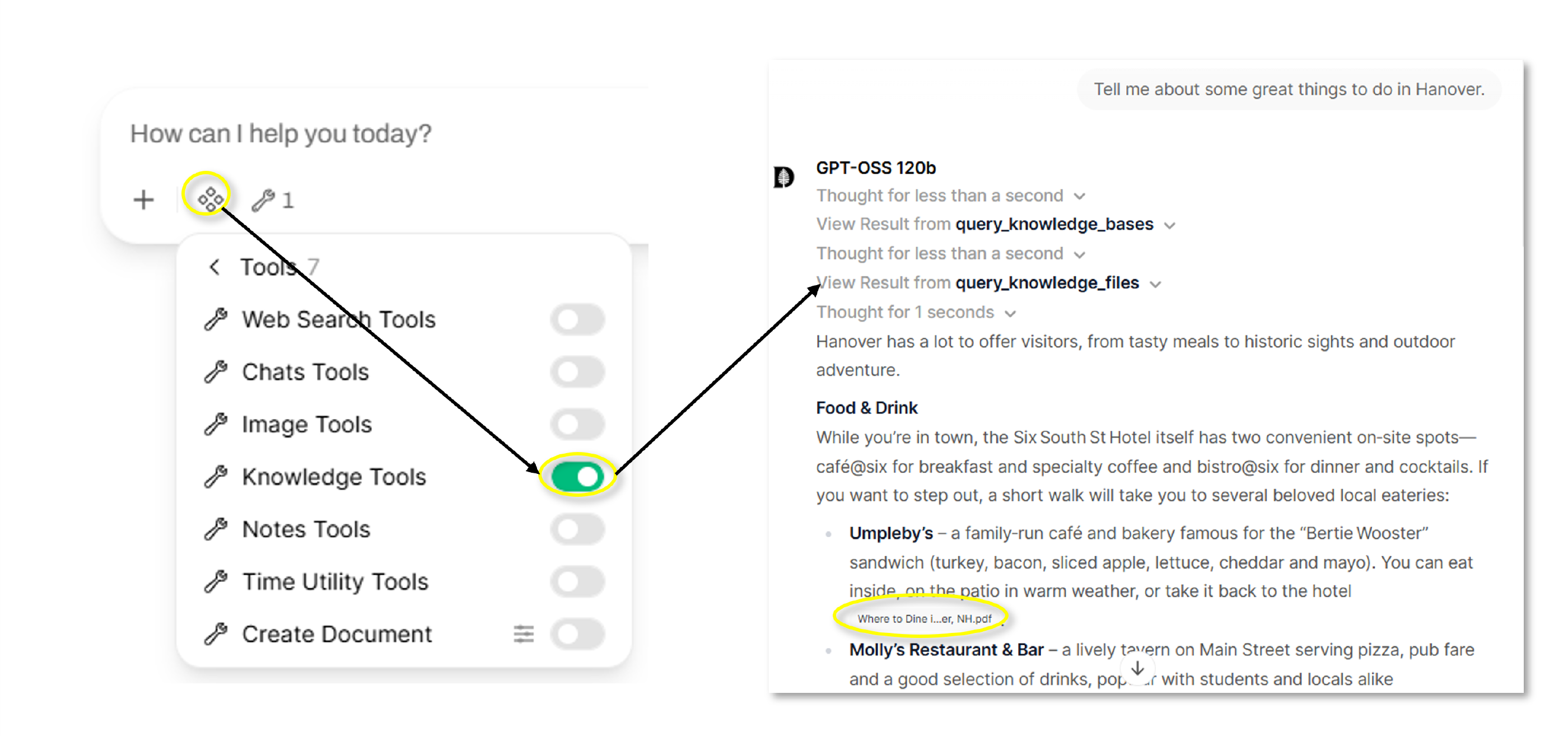
The “Knowledge” tool allows the Dartmouth Chat model to list, view, and query available Knowledge collections on an on-demand basis. This includes both those created by you and shared with you.
NOTE: The use of Knowledge is on-demand, with the model evaluating whether to include the supplied information as part of its context. If you attached a Knowledge expecting its contents to be part of every response without a lookup step, the model may skip it when the topic doesn’t come up. If you name it directly in your question (e.g, “check the attached [X] for…”) the model will look it up.
How do I use the Knowledge Tool?
You can access the Tool’s functionality by simply turning it on in the Tools menu. The model will choose to search the Knowledge available to it or not based on the content of the input prompt.
Didn’t find what you needed? Please reach out to research.computing@dartmouth.edu .