Knowledge Tool
Overview
Tools can be used within Dartmouth Chat to expand its functionality by performing simple tasks. Behind the scenes, Tools are Python scripts that – when enabled and configured – allow you to access additional functionality within Dartmouth Chat. Tools are enabled by the user, but triggered by the model. Turning them on does not guarantee that the model will use it. Once it is enabled, however, you can explicitly ask the model to use a tool.
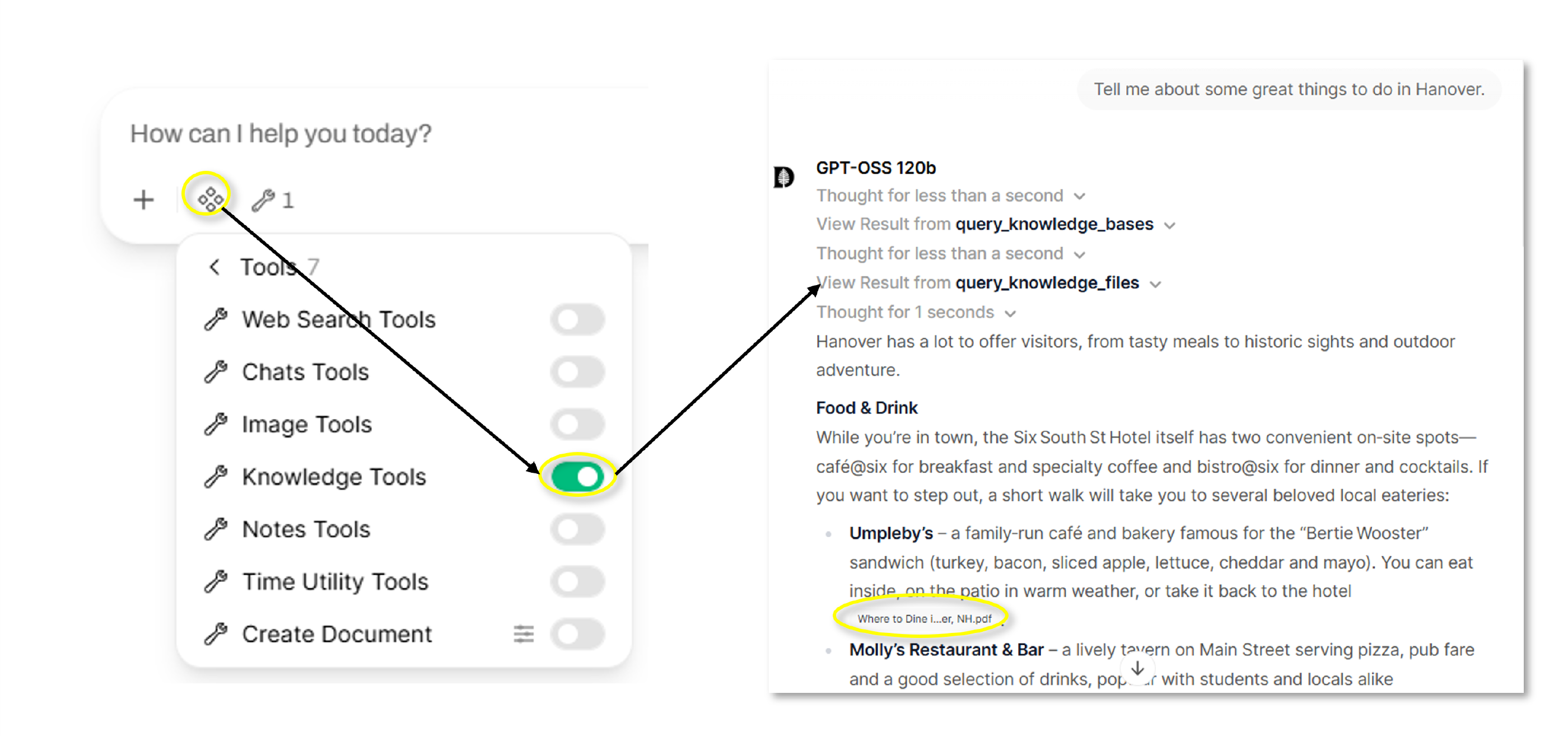
The “Knowledge” tool allows the Dartmouth Chat model to list, view, and query available Knowledge collections. This includes both those created by you and shared with you.
Of note, using the Knowledge tool is different than actively attaching specific Knowledge to a conversation. While the tool is enabled by the user, it is triggered by the model when it is deemed relevant to formulating a response. To force the use of specific Knowledge, consider explicitly attaching it to the conversation (see “How do I create and manage knowledge bases?”).
How do I use the Knowledge Tool?
You can access the Tool’s functionality by simply turning it on in the Tools menu. The model will choose to search the Knowledge available to it or not based on the content of the input prompt.
Didn’t find what you needed? Please reach out to research.computing@dartmouth.edu.