Email Tool
Overview
Tools can be used within Dartmouth Chat to expand its functionality by performing simple tasks. Behind the scenes, Tools are Python scripts that – when enabled and configured – allow you to access additional functionality within Dartmouth Chat. Tools are enabled by the user, but triggered by the model. Turning them on does not guarantee that the model will use them. Once a tool is enabled, however, you can explicitly ask the model to use it.
The “Email” tool allows the Dartmouth Chat model to send email directly from the interface to your email address.
Of note, at present the email tool can only send email to your email address (i.e., the user logged into Dartmouth Chat).
How do I use the Email Tool?
You can access the Tool’s functionality by simply turning it on in the Tools menu. The model will choose to send an email or not based on the content of the input prompt.
By default, email will format the message in markdown format. If you want it to format the response to look like it does in Dartmouth Chat, request that the response be formatted using HTML in your prompt. The email will also contain a footer to provide context - i.e., “This email was sent by Dartmouth Chat on behalf of [user].”
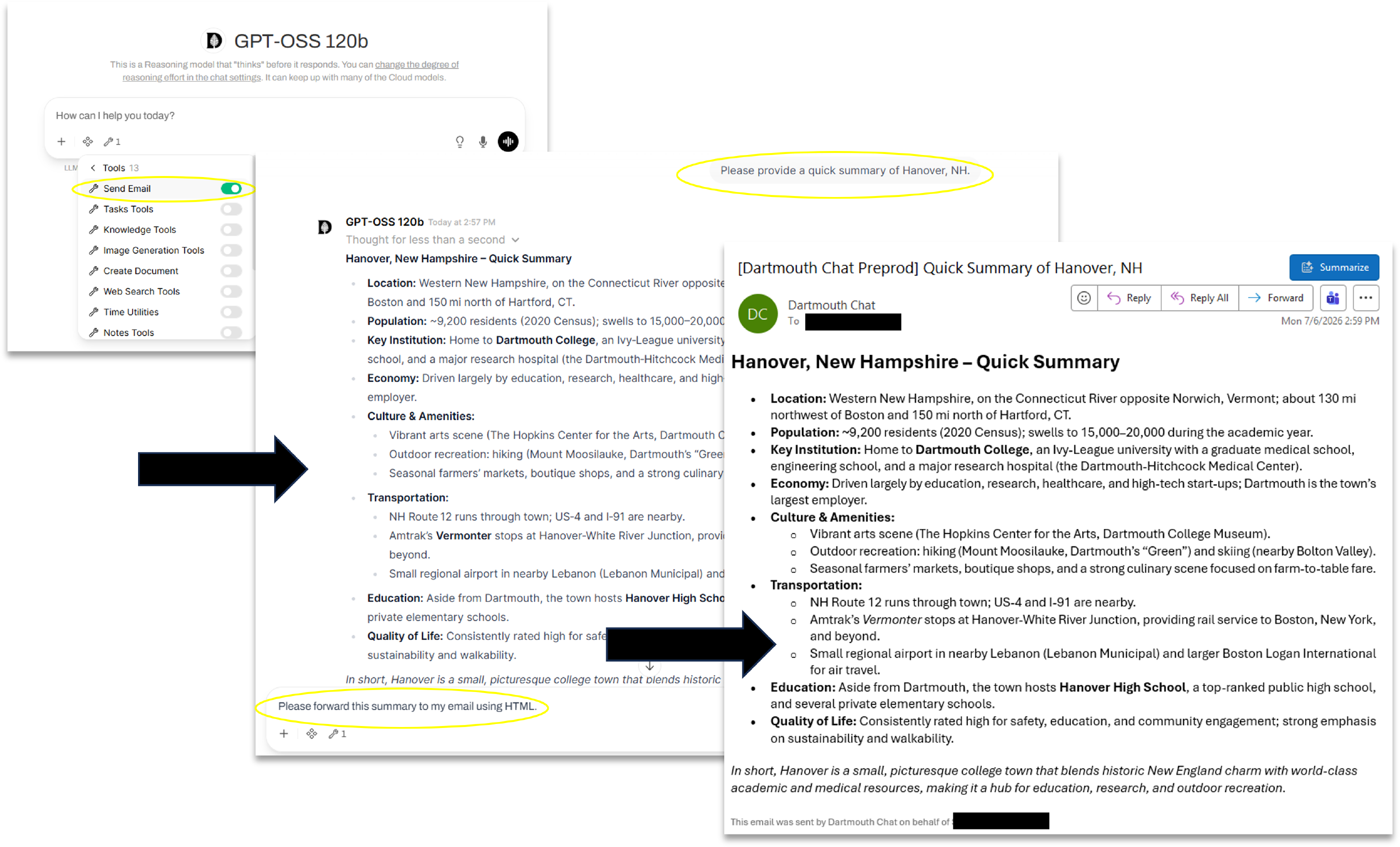
You can use this tool in conjunction with other Dartmouth Chat functionality, such as Automation . You could, for instance, forward the content produced via automation to your email address.
Didn’t find what you needed? Please reach out to research.computing@dartmouth.edu .