How can I compare the results of two different models?
Dartmouth Chat allows you to select multiple models so that you may simultaneously compare the results of the same prompt across multiple models (and even multiple instances of the same model).
You can find the name of the currently selected model on the right-hand side of the prompt window by pulling down on the “down arrow” icon. You can then click the Compare icon to select multiple models. As you select other models a checkbox will appear next to each of your selections. Click on the name of the model to add it to the list of models to be used in your chat; click it again to add multiple instances of the model. Click on the number (i.e., “x1”) to remove a model from your list.
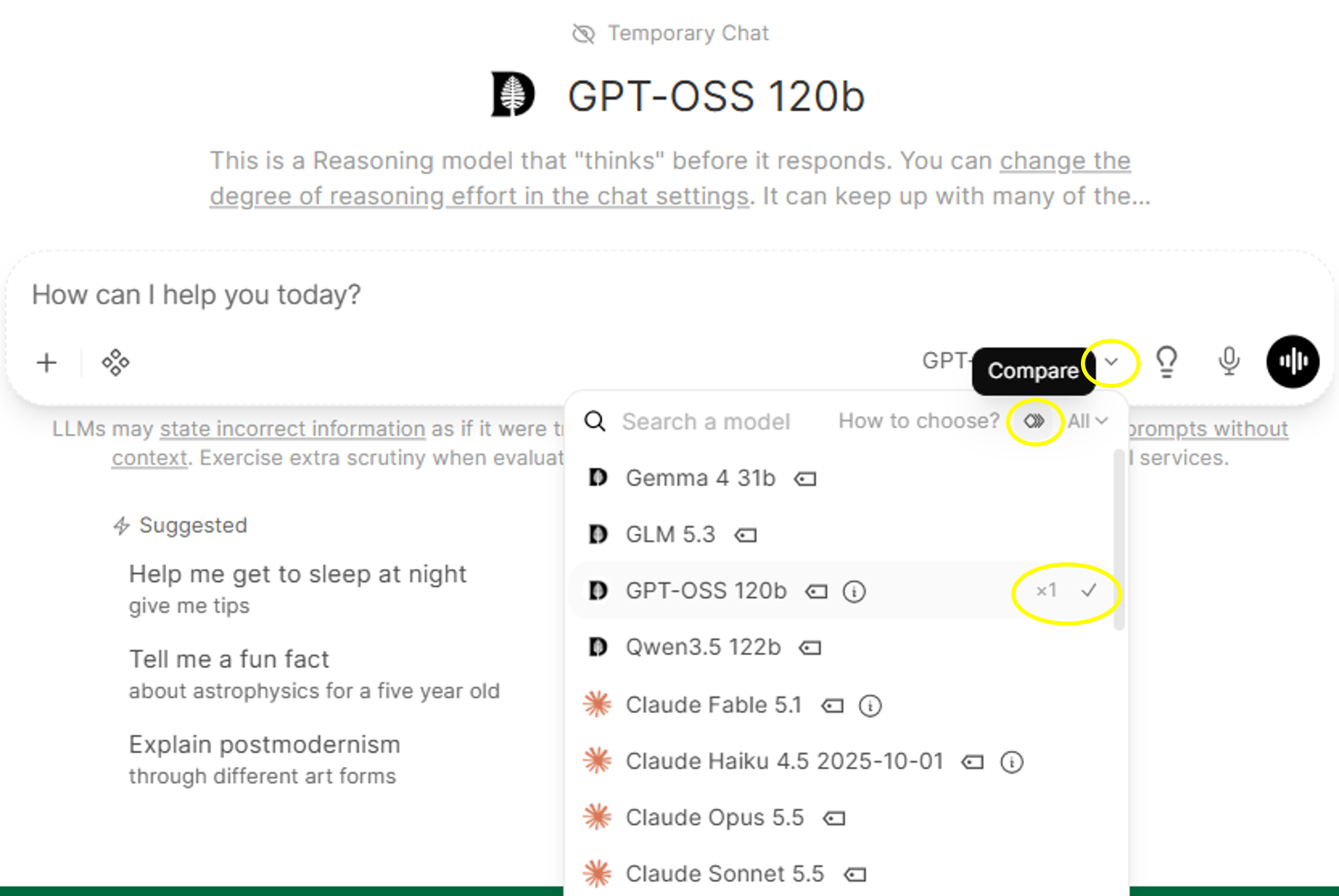
Add and execute your prompt as usual. Results will be in a split screen so you can directly compare one to the other. Adding an additional model should preserve all existing tool, skill, filter, and feature selections from the original chat.
Keep in mind selecting multiple models could use significantly more tokens in your work, depending on the models selected.

Didn’t find what you needed? Please reach out to research.computing@dartmouth.edu .